Register Multiple Adapter Instances as a Windows Service
You can specify how multiple OPC UA client adapters connect to different OPC UA servers.

- You can only start the services using the HTTP protocol.
- For more details about the adapter Windows service configuration, in SORIS, see (Optional) Configure Adapter Windows Service.
- In C:\Program Files (x86)\Siemens\OPC UA Adapter, open the file Install_AdapterAsServiceWithName_HTTP.bat with a text editor.
- Edit the following parameter:
- Next to
wsiurl, replace#WSIURL#with the web application URL, as follows:
a. In SMC, select Websites > Website > Web Services Application.
b. Copy the web application URL from the Web Application Details expander to wsiurl. 
- Save the changes.
- Create a duplicate of the BAT file, and open it with a text editor.
- Modify the following parameters:
- Next to
port, replace#PORT#with the appropriate port number. For example,port:8082.
NOTE: The default port number is 8080 that can be used for only one of the adapter instances if not already in use. For any other adapter instances, use a free port number different any other port number already in use. -
-serviceName:[adapter instance name].
For example,-serviceName:Primary.
NOTE: A service name must be unique. - Add the WebSocket port parameter:
-
-wsport:[port number]
For example:–wsport:8007
NOTE: The default WebSocket port number is 8085 that can be used for only one of the adapter instances if not already in use. For any other adapter instances, use a free WebSocket port number different any other port number already in use. 
- Save the changes.
- Repeat the steps 4-7 above for all the adapter instances to register.
- Run the adapter instances BAT files as administrator.
- The multiple instances of the OPC UA client adapter are installed and started automatically among the Windows services.
- In C:\Program Files (x86)\Siemens\SORIS OPC UA Adapter multiple Configurations_[adapter service name] folders are created, each one including any other files that allow connecting to the specific OPC UA server.
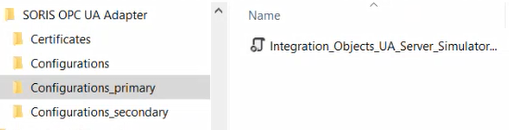
For details about back and restore, see OPC UA Configuration Backup and Restore.
NOTE: The AlarmTable.conf file, which includes the alarm classes configuration, is available in C:\Program Files (x86)\Siemens\SORIS OPC UA Adapter\ Configurations. This file is shared among the multiple adapter instances.
If for any reason you need to uninstall one of the multiple adapter instances, do the following:
- In C:\Program Files (x86)\Siemens\OPC UA Adapter, open the file Uninstall_AdapterAsServiceWithName_HTTP.bat with a text editor.
- Modify the following parameters by entering the specific settings of the service you want to uninstall:
#WSIURL##PORT#-
#SERVICENAME# -
#WSPORT# 
- Save the changes.
- Run the adapter instance uninstall BAT file as administrator.
Before proceeding with uninstalling the OPC UA adapter extension, you must first uninstall all the multiple adapter instances as described in the above procedure.